
Overview
By default, LaddrPay collects your payments over a period of time and then transfers them to your specified bank account in bulk.
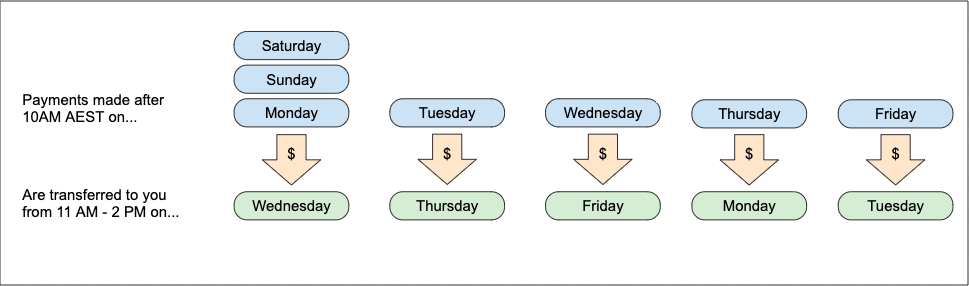
Full transactions are collected between midnight and midnight UTC (10 AM AEST) and transferred 48 to 72 hours later. The payout schedule adheres to the following.
Settings
If you wish to change the Payment confirmation notification or payout report emails you can do so under settings > notification.
Payout Reporting
As soon as a payout is generated, LaddrPay will send an email with an accompanying transaction report to one or many email addresses as entered when you set up your account. If you are not receiving these emails or wish to change where the emails are sent, please contact our team through live chat or via email at support@limepayladdr.zendesk.com
We collect payments and deposit them once a business day into your nominated account. Each payout is accompanied by a email report breaking down which payments are included allowing for easy reconciliation of payments in your accounting package of choice.